How technicians opt in to dispatch texts
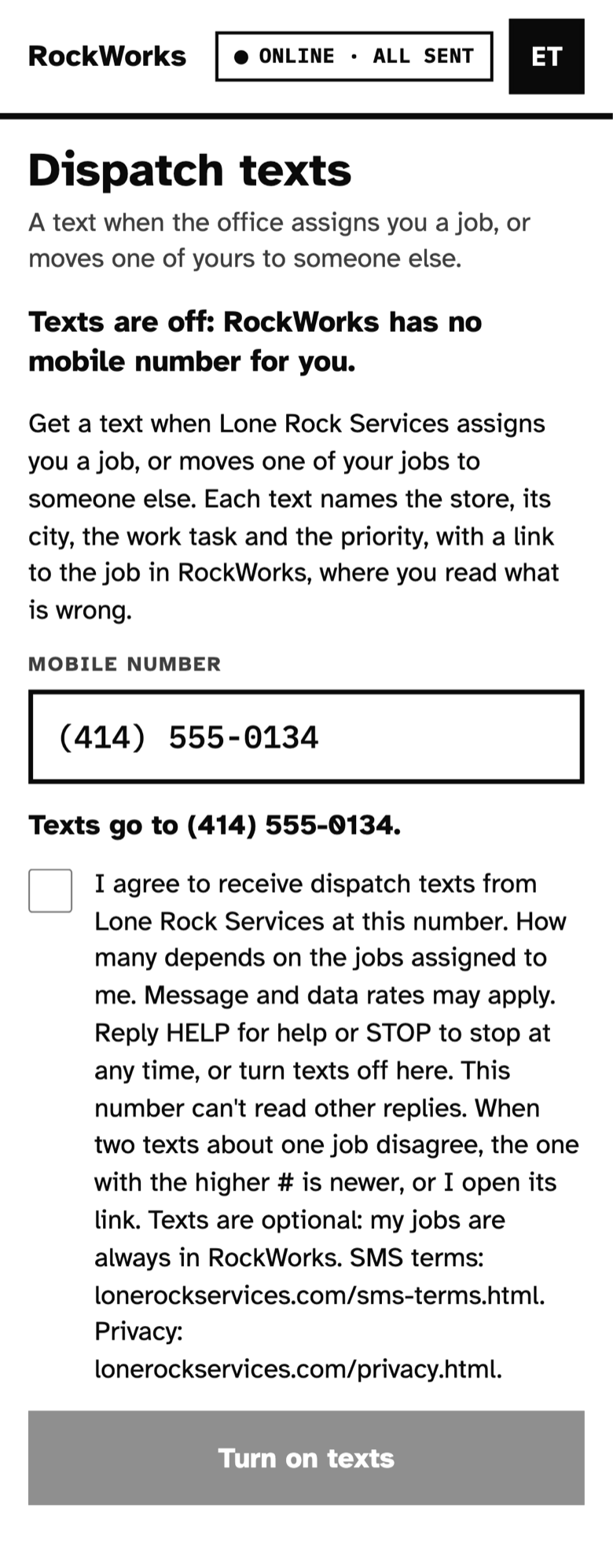
This is the screen in RockWorks, Lone Rock's dispatch app, where a Lone Rock field technician turns on dispatch texts. Only Lone Rock's own technicians, signed in to RockWorks, can reach it.
The steps
- In RockWorks, the technician opens the account menu and chooses Dispatch texts.
- They enter their mobile number. RockWorks reads it back to them.
- They read the words below and tick the box agreeing to them. The box is never ticked for them.
- They tap Turn on texts. A welcome text confirms it, and they can reply STOP or turn texts off in RockWorks at any time.
The words they agree to
Get a text when Lone Rock Services assigns you a job, or moves one of your jobs to someone else. Each text names the store, its city, the work task and the priority, with a link to the job in RockWorks, where you read what is wrong.
I agree to receive dispatch texts from Lone Rock Services at this number. How many depends on the jobs assigned to me. Message and data rates may apply. Reply HELP for help or STOP to stop at any time, or turn texts off here. This number can't read other replies. When two texts about one job disagree, the one with the higher # is newer, or I open its link. Texts are optional: my jobs are always in RockWorks. SMS terms: lonerockservices.com/sms-terms.html. Privacy: lonerockservices.com/privacy.html.
The text message terms and the privacy policy apply.